

You have outgrown basic voice control. Your lights, sensors, locks and switches need to react instantly, work when the internet drops, and follow complex logic you design yourself. When your current setup forces you into cloud delays or limited routines, it is time to move to a hub built for serious control.
In this guide we evaluated eight hubs that appeal to advanced users, from local-first powerhouses to versatile multi-protocol bridges. You will see how each handles automation depth, protocol coverage and privacy, so you can match a hub to your home size and technical comfort. Explore our curated Smart Speakers & Hubs collection for more context on how these hubs fit into larger setups.
This page contains affiliate links, and we may earn a commission if you purchase through them at no extra cost to you, which does not affect which products we include or how we rank them.
Quick Picks at a Glance

Home Assistant Green Smart Home Hub by Nabu Casa

Prime Aeotec Smart Home Hub V3 – SmartThings, Z-Wave

Prime Philips Hue Bridge Pro Smart Lighting Hub

Prime Aqara Hub M3 Smart Home Hub with Matter

Lutron Caseta Smart Hub L-BDG2-WH

Prime Hubitat Elevation C-8 Pro Smart Home Hub
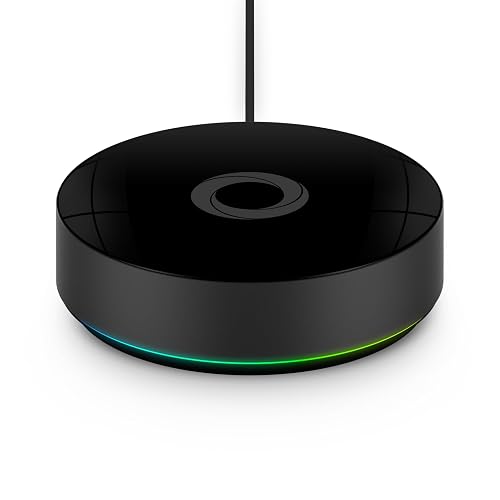
Homey Pro (2026) Smart Home Hub – Z-Wave

Prime Samsung SmartThings Hub 3rd Gen (GP-U999SJVLGDA)
As an Amazon Associate we earn from qualifying purchases. Product prices and availability are accurate as of the date/time indicated.
Pros
- Official Nabu Casa hardware with guaranteed compatibility and support
- Simple plug and play setup with no flashing or assembly required
- Silent, compact and ultra energy efficient fanless design
- Powerful quad core performance with 4GB RAM and 32GB eMMC storage for years of data
- Local first privacy with flexible USB expansion for wireless protocols
Cons
- No built in Wi-Fi, requires a wired Ethernet connection
- No integrated Zigbee, Z-Wave or Thread radio, requires separate USB dongles
- Secure remote access requires Home Assistant Cloud subscription or manual configuration
Home Assistant Green is the official smart home hub from Nabu Casa, designed to make Home Assistant accessible to everyone. It is perfect for beginners who want to avoid Raspberry Pi builds and for enthusiasts who want a stable, supported foundation.
In real world use, it handles hundreds of devices and complex automations with ease thanks to its quad core processor and 4GB of RAM. With Home Assistant OS preinstalled, setup takes minutes and the 32GB eMMC storage reliably keeps years of local history and logs.
The hardware itself is compact, fanless and completely silent, so it can sit anywhere in your home without distraction. Its low power draw of just a few watts makes it ideal for always on operation, while gigabit Ethernet ensures a rock solid connection.
The main trade offs are connectivity, as there is no Wi-Fi and no built in Zigbee, Z-Wave or Thread radio. You will need an Ethernet port nearby and separate USB dongles for wireless protocols, plus a Cloud subscription or technical setup for easy remote access.
Overall, Home Assistant Green delivers the simplest and most reliable way to run Home Assistant with official support and local privacy. If you want a clean, efficient and future proof hub to unify your smart home, it is an excellent choice.
Processor: Quad core processor for smooth automation and multitasking with add-ons.
Memory and Storage: 4GB RAM and 32GB fast eMMC onboard storage for years of data.
Connectivity: Gigabit Ethernet for stable wired connection, USB ports for Zigbee, Z-Wave and Thread dongles.
Design: Compact, fanless and silent design with ultra low power consumption.
Software: Ships with Home Assistant OS preinstalled and supported by Nabu Casa.
Pros
- Widest protocol compatibility including Matter, Zigbee and Z-Wave Plus on the V3 model
- Many automations run locally for improved speed and reliability
- Intuitive SmartThings app with room grouping, scenes and remote access
- Supports both WiFi and Ethernet for flexible, stable installation
Cons
- V4 model drops Z-Wave support, so V3 is required for existing Z-Wave devices
- Heavily dependent on the SmartThings app and ecosystem to function
- Certified for North America only, not ideal for international use
The Aeotec Smart Home Hub V3 is the official hardware for the Samsung SmartThings platform, bringing Zigbee, Z-Wave, Matter, WiFi and cloud devices together in one place. It is ideal for anyone who wants a single app to control lights, sensors, locks and appliances from many different brands.
In real world use, the hub excels at creating reliable automations that often run locally for quicker response times. You can build routines for mornings, evenings or energy savings in a few taps, and coordinate them with Alexa or Google Assistant for voice control.
Setup is straightforward with the SmartThings app for iOS and Android, offering both Ethernet for initial stability and WiFi for flexible placement. The compact hub has a clean, minimal design that blends easily on a shelf or near your router without drawing attention.
The main drawback is the split between V3 and V4 models, as the newer V4 drops Z-Wave support which matters if you own older Z-Wave devices. Like most SmartThings gear, it also depends heavily on the app and cloud ecosystem, and it is certified for North America only.
Overall, this hub remains a top choice for building a flexible, future proof smart home thanks to its Matter support and wide compatibility. If you want one central controller that works with thousands of devices and grows with your needs, the Aeotec Smart Home Hub V3 is a smart, reliable investment.
Model: Aeotec Smart Home Hub V3 (SmartThings Hub)
Supported Protocols: Zigbee, Z-Wave Plus (V3 only), Matter, WiFi, Cloud-connected devices
Connectivity: Ethernet and WiFi
App Compatibility: SmartThings app for iOS, iPadOS and Android
Voice Control: Works with Amazon Alexa and Google Assistant
Region Certification: Designed for use in North America
Choose the V3 model if you have or plan to use Z-Wave devices, as the newer V4 does not support Z-Wave. If your home uses only Zigbee, Matter and WiFi, either version will work well.
Start setup with the included Ethernet cable for the most stable pairing process, then switch to WiFi in the app if needed. Always verify new devices are Works with SmartThings certified on the manufacturer website before buying.
If you are migrating from an older hub, use the SmartThings exclusion tool to properly remove Z-Wave devices before pairing them to the new Aeotec hub for a smooth transition.
Pros
- Huge capacity for large homes, 150+ lights and 50+ accessories with 15x more memory than previous Bridge
- True wireless placement plus Zigbee mesh for instant, reliable control that does not strain WiFi
- MotionAware technology adds motion sensing without buying separate sensors
- Matter certified and compatible with all major platforms including Apple Home, Alexa and Google
- Ultra secure with advanced encryption and Zigbee Trust Center protection
Cons
- Automatic migration limited to one existing Bridge, additional Bridges must be moved manually
- Does not support older non-Zigbee 3.0 or SmartLink devices
- Some third party apps have not yet updated to support the new HTTPS security standard
The Philips Hue Bridge Pro is the next generation brain for your Hue ecosystem, designed for enthusiasts and large homes that have outgrown the original Bridge. It is built for users who want wireless flexibility, massive device capacity and deeper integration with Matter, Apple Home, Alexa and Google.
In real world use, the Hue Chip Pro with its 1.7 GHz quad-core CPU and 4GB DDR4 memory delivers noticeably faster response and smoother automations. You can manage over 150 lights and 50 accessories, store up to 500 scenes, and run complex AI powered features without lag, while the Zigbee mesh ensures lights stay responsive even when WiFi is down.
Design wise, the Bridge Pro finally cuts the cord with a fully wireless form factor so you can place it centrally for best coverage. Build quality feels premium and purposeful, with a compact hub that prioritizes performance and security, including advanced encryption and the new Zigbee Trust Center.
There are a few tradeoffs to consider. The app only auto migrates one existing Bridge, so multi Bridge setups require manual work, and legacy non Zigbee 3.0 devices are not supported. A handful of third party integrations also still need to update for the new HTTPS requirements.
Overall, the Hue Bridge Pro is a powerful and worthwhile upgrade for dedicated Hue users and growing smart homes. If you want speed, scale, MotionAware convenience and future proof Matter support in one secure hub, this is the definitive choice.
Pros
- Supports Matter Bridge and Matter Controller plus Thread Border Router for wide ecosystem compatibility
- Edge Hub enables fast local automations that continue to work during internet outages
- Flexible power and connectivity with dual band Wi-Fi, PoE and USB-C UPS support
- Privacy focused design with 8GB encrypted local storage and no microphone or camera
- Built in 95dB speaker and 360 degree IR blaster with feedback for alerts and legacy device control
Cons
- Only compatible with Aqara Zigbee devices, not third party Zigbee devices
- IR to Matter integration limited to one AC device at a time
- Requires repeaters to reach full capacity of 127 Zigbee plus 127 Thread devices
The Aqara Hub M3 is the flagship Edge Hub designed to unify and future proof your smart home. It combines Zigbee, Thread, Bluetooth, Wi-Fi and IR with both Matter controller and Matter bridge functions, making it ideal for existing Aqara users and anyone building a Matter ecosystem with Apple Home, Alexa, SmartThings or Home Assistant.
In real world use, its Edge Hub leadership stands out by moving cross hub automations from the cloud to local processing for faster, more reliable performance during outages. The 360 degree IR blaster with learning and status feedback is especially useful, letting you expose an IR air conditioner to Matter as a thermostat when paired with an Aqara temperature sensor.
Build quality is practical and flexible, with included mounts for tabletop, wall or ceiling placement and robust connectivity via dual band Wi-Fi with WPA3, Ethernet with PoE, and USB-C for power bank backup. Privacy is a clear priority, as the M3 has no microphone or camera and stores automations locally on 8GB of end to end encrypted eMMC storage, plus a loud 95dB speaker for security alerts.
There are limitations to consider before buying. The M3 only works with Aqara Zigbee devices and will not pair with third party Zigbee products, and Matter over IR is limited to a single AC unit at a time. You will also need repeaters to hit the maximum capacity of 127 Zigbee and 127 Thread devices, and optimal placement is within 6 to 19 feet of your router.
Overall, the Hub M3 is a powerful upgrade for Aqara households that want centralized local control and broad Matter compatibility. If you value stability, privacy and the ability to lead a cluster of Aqara hubs while bridging legacy IR devices into Matter, it is one of the most capable hubs available.
Protocols Supported: Aqara Zigbee, Thread Border Router, Bluetooth, Wi-Fi, IR, Matter Bridge and Matter Controller
Device Capacity: Up to 127 Aqara Zigbee devices plus 127 Thread devices with repeaters, supports hub cluster leadership
Connectivity: Dual band 2.4GHz and 5GHz Wi-Fi with WPA3, RJ45 Ethernet with PoE, USB-C for power and UPS backup
Storage and Privacy: 8GB eMMC end to end encrypted local storage, no microphone or camera
Additional Features: 360 degree IR blaster with learning and feedback, 95dB speaker with custom ringtones, MagicPair setup, wall and ceiling mount included
Choose the M3 if: You already use Aqara sensors and want local Edge automations, Matter support, and the ability to control IR air conditioners and bridge Aqara scenes to Home Assistant or Apple Home.
Consider alternatives if: You need broad third party Zigbee compatibility or want to expose multiple IR air conditioners to Matter at once, as the M3 is limited to Aqara Zigbee and one Matter AC device.
Setup tip: Place the hub 6 to 19 feet from your router, use PoE or USB-C backup for stability, and use the migration feature to move devices from older Aqara hubs without manual re-pairing.
Pros
- Extremely stable and responsive connection that does not compete with WiFi
- Excellent compatibility with major voice assistants and smart home ecosystems
- Supports large systems up to 75 devices for whole home coverage
- Powerful app features including scenes, scheduling, Smart Away and geofencing
- Easy installation with no neutral wire required for Caseta dimmers
Cons
- Requires a wired Ethernet connection to your router, not WiFi only
- Hub alone has no function without separate Caseta dimmers, switches or shades
- Not a universal hub, limited to Lutron Caseta and Serena devices with no Zigbee or Z-Wave support
The Lutron Caseta Smart Hub L-BDG2-WH is the essential brain of the Caseta ecosystem, connecting dimmers, switches, plug-in lamp modules and Serena shades to your smartphone and voice assistants. It is built for homeowners who want dependable, whole home lighting control without the need to replace every bulb with a smart bulb.
In real world use, its standout feature is Clear Connect RF technology, which provides rock solid performance without congesting your WiFi network. You can control lights and shades from anywhere, set schedules based on time of day, create one touch scenes, and use geofencing to automate lights as you come and go, all with fast, reliable response to voice commands.
Design wise, the hub is compact and minimal in white, intended to sit discreetly beside your router with just a power and Ethernet connection. Build quality is solid and purpose built for always on reliability, and the Lutron app makes pairing and managing devices simple even for beginners.
Drawbacks are worth noting. The hub does nothing on its own and requires investment in compatible Caseta devices to be useful. It also needs a physical Ethernet port on your router, which can be inconvenient if your networking gear is hidden away, and it will not serve as a general purpose hub for Zigbee or Z-Wave accessories.
Overall, the Caseta Smart Hub is an excellent foundation if you value stability, broad ecosystem support and scalability. For anyone planning a serious smart lighting system that just works every time, it is one of the most reliable and worthwhile hubs you can choose.
Pros
- 100 percent local processing for faster response and reliable offline operation
- Extensive compatibility across Matter 1.5, Z-Wave 800 LR, Zigbee 3.0, Bluetooth and Wi-Fi
- Powerful customization via Rule Machine and AI assisted automation
- No monthly fees with free lifetime software updates
- Strong privacy with no cloud dependency required
Cons
- Steeper learning curve for beginners, especially when building complex Rule Machine automations
- Interface prioritizes function over polish compared to more consumer friendly apps
- Requires compatible devices to unlock full multi-protocol potential, not a standalone solution
The Hubitat Elevation C-8 Pro is a powerful smart home hub designed for users who want complete local control without relying on the cloud. It is built for enthusiasts, power users and privacy focused households who want automations that keep working even when the internet drops.
In real world use, its local processing delivers noticeably faster response times for lights, locks and sensors compared to cloud based systems. The standout is its broad protocol support including Matter 1.5, Z-Wave 800 LR, Zigbee 3.0, Bluetooth and Wi-Fi, plus AI assisted text to automation and the deeply customizable Rule Machine for complex routines.
The hub features a compact, understated design that fits easily alongside a router or on a shelf without drawing attention. Build quality is solid and purpose built for always on reliability, with straightforward connectivity options that support a mixed device ecosystem without requiring a full hardware replacement.
That power does come with a learning curve, and beginners may find the interface less intuitive than plug and play alternatives from mainstream brands. Creating advanced automations takes time to master, and users expecting a highly polished mobile app experience may find it more functional than flashy.
Overall, the Hubitat Elevation C-8 Pro is an excellent long term platform for anyone who values speed, privacy and flexibility over simplicity. If you want a future proof, subscription free hub that evolves with free updates and handles virtually any protocol, this is one of the most capable options available.
Pros
- Widest protocol support in one hub with seven plus technologies including Matter and Thread
- Local processing improves speed, privacy and reliability versus cloud-only hubs
- Works with over 50,000 devices from 1,000+ major brands with Official and Community apps
- Flexible automation from simple one-tap Flows to powerful Advanced Flows
- Remote access plus energy monitoring and sensor alerts from anywhere
Cons
- Advanced Flows and multi-protocol setup can have a learning curve for beginners
- Community-built apps vary in quality, features and long-term support
- Requires commitment to the Homey ecosystem for full functionality
Homey Pro 2026 is a premium universal smart home hub designed to unify fragmented ecosystems into one seamless system. It is ideal for enthusiasts and growing smart homes that use multiple brands and protocols and want centralized control without juggling separate bridges or apps.
In real-world use, its standout strength is breadth and flexibility. With Wi-Fi, Zigbee, Z-Wave Plus, BLE, Infrared, Matter and Thread onboard, it connects to over 50,000 devices from more than 1,000 brands. Homey Flow makes automation accessible, from one-button scenes to advanced multi-device logic that runs locally for fast, reliable execution.
The hub features a clean, compact design built for always-on operation with upgraded internals that double the RAM. This extra headroom supports larger device counts and more complex automations while keeping performance smooth. Setup and management are handled through the intuitive Homey mobile app and web app.
There are some tradeoffs to consider. New users may find advanced configuration complex, and the quality of Community-built apps can be inconsistent. As a local-first system, some integrations still rely on cloud services, so experience can vary by brand.
Verdict: Homey Pro 2026 is one of the most versatile and future-ready hubs available. If you want maximum compatibility, local control and powerful automation in a single device, it is an excellent investment for a serious smart home.
Technologies Supported: Wi-Fi, Zigbee, Z-Wave Plus, Bluetooth Low Energy (BLE), Infrared, Matter and Thread. All protocols are managed locally on the hub for reduced cloud dependency.
Compatibility: Works with over 50,000 devices from more than 1,000 brands including Sonos, Philips Hue, IKEA, Aqara, TP-Link, Yale, LG, Dyson, Shelly and Somfy. Supports Official and Community Homey Apps with new devices added regularly.
Control and Automation: Homey app for mobile control and Homey Web App for Advanced Flows. Features remote access, real-time insights, historical energy usage tracking and sensor alerts. Compatible with Siri, Alexa and Google Home for voice control.
Pros
- Broad support for Zigbee, Z-Wave and cloud protocols covers most smart devices
- Single SmartThings app simplifies monitoring and control
- Strong automation features for personalized routines and triggers
- Seamless voice integration with Alexa and Google Assistant
Cons
- Relies on cloud processing, so some automations need internet and may have slight delay
- No battery backup, unlike the previous generation model
- Setup and device pairing can be complex for beginners
The Samsung SmartThings Hub 3rd Generation GP-U999SJVLGDA is the brain of a connected home, built to wirelessly link a wide range of smart devices so they work together. It is perfect for homeowners who have mixed devices and want centralized control through a single app with support for Alexa and Google Home.
In everyday use, the hub stands out for reliable automation and broad compatibility. You can set lights, plugs and sensors to react when doors open or when people arrive and leave, and the SmartThings app makes monitoring and control simple from your phone.
The design is compact, clean and finished in matte white to blend discreetly into any room. It is smaller than previous generations and offers both WiFi and Ethernet connectivity, so placement is flexible and setup is straightforward.
There are a few drawbacks to note. Many automations depend on cloud processing, which can introduce minor latency and requires an internet connection. This generation also removes the battery backup found in the earlier model, which may be a concern for security focused users.
Overall, the SmartThings Hub 3rd Generation remains one of the most versatile hubs for building a unified smart home. If you want wide device support, easy app control and strong voice assistant integration, it is a reliable and future ready choice.
Model: Samsung SmartThings Hub 3rd Generation GP-U999SJVLGDA. Connectivity: Zigbee, Z-Wave, Cloud to Cloud, WiFi and Ethernet.
Compatibility: Works with a wide range of smartphone connected devices. Voice control supported through Alexa and Google Home via the SmartThings app.
Control: Monitor and automate devices from a single smartphone app for iOS and Android. Create custom routines based on sensors, presence and schedules.
Design: Compact white hub with wireless setup. Powered by AC adapter, no internal battery backup in this generation.
Buying Guide: What Advanced Users Should Prioritize
Local Processing vs. Cloud Reliance
If reliability and privacy matter to you, prioritize local execution. The Smart Home & Technology landscape is shifting toward local-first designs for good reason. Hubitat Elevation C-8 Pro runs automations directly on the hub, so your lights, locks and thermostats keep working even when your internet does not, and Home Assistant Green keeps all your data on its 32GB eMMC storage inside your home.
Cloud-dependent hubs can still be powerful, but they introduce latency and a single point of failure. Aeotec Smart Home Hub and SmartThings Hub 3rd Generation now run many automations locally through the SmartThings app, which improves speed, yet they still rely on cloud services for some features. For advanced users building critical routines like security or climate control, local processing delivers faster response and stronger resilience.
Protocol Support and Future Proofing
Your hub should speak every language your devices do. Homey Pro stands out with seven technologies in one enclosure including Wi-Fi, Zigbee, Z-Wave Plus, BLE, Infrared, Matter and Thread, all processed locally. Hubitat Elevation C-8 Pro covers Matter 1.5, Z-Wave 800 Series with Long Range, Zigbee 3.0 and Bluetooth, while Aqara Smart Home Hub M3 handles Zigbee, Thread, Bluetooth, Wi-Fi and even Power over Ethernet.
Choosing broad protocol support prevents you from replacing hardware later. Philips Hue Bridge Pro is exceptional for lighting with support for 150+ lights and 50+ accessories plus Zigbee Trust Center security, but it is lighting focused. Lutron Caseta Smart Hub uses Clear Connect Technology that avoids Wi-Fi congestion and integrates beautifully with Alexa, Apple Home and Google Home for lighting and Serena shades. If you want one hub to unify mixed brands, look for Matter certification and multi-radio coverage in our Smart Speakers & Hubs guides.
Automation Engine Depth and Customization
Advanced users need more than simple if-this-then-that. Home Assistant Green gives you the deepest canvas, letting you dim lights when a movie starts, cut heat when you leave, and build highly personalized scenes across hundreds of devices with local data ownership. Hubitat Elevation C-8 Pro offers a unique Text-to-Automation feature that builds routines automatically, plus the legendary Rule Machine for complex conditions, multiple triggers and custom logic without cloud dependency.
For a more visual approach, Homey Pro lets you create Flows on your phone and Advanced Flows in the web app to make diverse brands work in harmony, with real-time insights and energy tracking. Aqara Smart Home Hub M3 acts as an Edge Hub that centralizes and localizes automations across other Aqara hubs and adds a 360 degree IR blaster that can expose an IR air conditioner to Matter when paired with a temperature sensor. If you prefer guided setup, Aeotec Smart Home Hub simplifies routine building in the SmartThings app while still supporting sophisticated scheduling.
Scalability, Connectivity and Ecosystem Fit
Think about how your system will grow over the next few years. Home Assistant Green includes a quad-core processor, 4GB RAM and USB expandability for Z-Wave, Zigbee and Thread sticks, so you can add radios as needed. Aqara Smart Home Hub M3 supports up to 127 Aqara Zigbee devices and 127 Thread devices, offers dual-band Wi-Fi with WPA3, PoE and a USB-C port for mini-UPS backup, plus 8GB of encrypted local storage. Our Smart Home & Technology coverage shows why wired Ethernet and PoE often beat Wi-Fi for hub stability.
Ecosystem fit is equally important. Lutron Caseta Smart Hub supports up to 75 Caseta devices and is ideal if your home is built around Lutron dimmers and Serena shades. Philips Hue Bridge Pro stores up to 500 personalized scenes and enables Hue MotionAware with just three Hue devices, no separate sensor needed. Homey Pro works with over 50,000 devices from more than 1,000 brands including Sonos, IKEA, Yale and Shelly, making it a strong choice if you want maximum brand freedom without juggling multiple apps.
- Confirm your must-have radios before you buy, then verify the hub supports them natively or via USB expansion.
- Prefer Ethernet or PoE for the hub location to reduce latency and improve reliability for local automations.
- Check Matter Bridge vs. Matter Controller roles if you plan to expose Aqara or Hue devices to Apple Home or Home Assistant.
- Consider encrypted local storage and no-subscription models if you want long-term ownership without ongoing fees.
Who Shouldn’t Buy These
These advanced hubs are not ideal if you want a simple, hands-off setup for just a few smart bulbs or a single voice assistant speaker, or if you have no interest in building routines and managing protocols. In that case you will be better served by a basic Wi-Fi bulb starter kit or a standalone smart speaker without a dedicated hub, which offers easier setup and lower complexity.
Final Thoughts
For maximum local control and endless customization, Home Assistant Green gives advanced users a private, powerful foundation, while Hubitat Elevation C‑8 Pro delivers fast local automations with broad Matter, Z-Wave and Zigbee support and no subscription required.
Frequently Asked Questions
What is the best smart home hub for advanced users who want full local control in 2026?
For full local control, look at Home Assistant Green and Hubitat Elevation C-8 Pro. Both run automations on the hub itself, keep your data at home, and continue working when the internet drops. Home Assistant Green offers deeper customization and USB expandability, while Hubitat adds Text-to-Automation and the Rule Machine for complex logic without coding.
Do I need a hub that supports Matter, Zigbee and Z-Wave at the same time?
You need the protocols your current and planned devices use. If your home mixes brands, a multi-protocol hub like Homey Pro or Hubitat Elevation C-8 Pro reduces the need for multiple bridges. Matter helps unify newer devices, but Zigbee and Z-Wave remain essential for many sensors, locks and switches in 2026.
Can I use multiple hubs together in one advanced setup?
Yes, many advanced users combine hubs. For example, you can pair a Philips Hue Bridge Pro for lighting with Home Assistant Green or Aqara Smart Home Hub M3 as a Matter Bridge to centralize control. Using a Smart Speakers & Hubs strategy with one primary controller and secondary bridges gives you the best of both worlds without duplicating automations.
How do I choose between Home Assistant and Hubitat for complex automations?
Choose Home Assistant Green if you want open-ended control, local data ownership and the ability to expand via USB radios and community integrations. Choose Hubitat Elevation C-8 Pro if you want powerful local automations with less manual configuration, thanks to automatic routine suggestions and continuous free updates. Both avoid mandatory subscriptions and support Matter, so your decision often comes down to how practical you want to be.





Write Your Review
No reviews yet. Be the first to share your experience!