

This article contains affiliate links. If you purchase through one of our links, we may earn a commission at no extra cost to you. This does not influence which products we include or how they are ranked.
To keep cables tidy under a desk, lift your power strip off the floor into a tray or mount, then bundle and route every cable tightly along the underside of the desktop and down one leg so nothing dangles, tangles, or catches your feet.
You do not need to drill or buy a lot of gear to get a clean look, you just need a simple system for grouping, routing, and shortening slack. Below you will find a step by step method that works for standing desks, gaming setups, and home offices, plus habits to keep it neat long term. For more organization inspiration, explore our guide to Office Storage & Organization solutions.
How to Organize Under-Desk Cables Step by Step
1. Unplug, Untangle, and Group by Destination
Start with everything unplugged so you can see what you actually have. Lay cables flat on the floor, remove twists and knots, and group them by where they go, for example monitor power and video together, chargers together, and peripherals together.
Label both ends with small tags or colored tape if you have many similar black cords. This makes rerouting faster and prevents you from unplugging the wrong thing later. See our related ideas in cable organization for a cleaner workspace for simple labeling tricks that save time.
2. Elevate Your Power Strip and Adapters
The biggest source of clutter is a power strip sitting on the floor with bricks and adapters dangling. Mount it under your desktop with a tray, clamp, or adhesive mount so it floats just below the surface and stays accessible but out of sight.
If you use a standing desk, leave a gentle service loop near the leg so the desk can move up and down without pulling. Position the strip near the back edge, with outlets facing outward for easy access and better airflow around chargers.
3. Route Cables Along the Frame, Not Across Open Space
Run your grouped bundles along the underside of the desktop and down a single leg, using the desk frame as a highway. Adhesive clips, hook and loop wraps, or a slim channel keep lines tight to the surface and prevent sagging.
Avoid crossing power and data cables at sharp angles where they can snag on your knees or chair. Keep the main trunk line straight along the back edge, then branch off short runs to your monitor, lamp, or dock. You can find more layout ideas in our standing desk setup tips to plan your route.
4. Shorten Slack and Secure Bundles
Extra length creates loops that collect dust and catch your feet or vacuum. Coil surplus cable into a neat figure eight, secure it with a reusable hook and loop tie, and tuck the coil into the tray or behind the leg.
Do not use single-use zip ties you have to cut every time you change something, use adjustable ties you can reopen. Leave a little slack at each device end so you can move your monitor or keyboard without strain on the connector.
5. Finish and Maintain for Daily Use
Do a final check from chair height and from the doorway, the two angles where mess is most visible. Tuck any hanging loops, press down adhesive mounts firmly, and wait a couple of hours before loading them fully if the instructions suggest it.
Build a 30 second habit, when you add a new charger, route it immediately along your existing trunk instead of dropping it. A quick monthly tidy prevents the slow creep back to chaos and keeps vacuuming and mopping easy.
Tools That Make Under-Desk Cable Management Easier
Quick Picks at a Glance

Prime Litwaro Under Desk Cable Management Tray
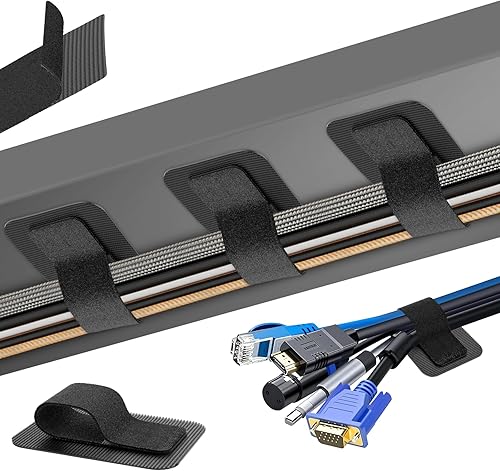
Prime Under Desk Cable Management Kit 20 Pack
As an Amazon Associate we earn from qualifying purchases. Product prices and availability are accurate as of the date/time indicated.
Pros
- Strong and durable carbon steel construction with no sagging
- Tool free clamp installation preserves desk surface
- Spacious tray hides power strips and bulky adapters
- Versatile fit for flat edge desks from 0.4 to 2 inches thick
- Mesh design keeps cables ventilated and easy to access
Cons
- Requires a flat desk edge within the supported thickness range
- Can be tight for very large or extra thick power strips
- Accessing devices like docks inside the tray can be less convenient
The Litwaro Under Desk Cable Management Tray is a clamp mounted mesh basket designed to hide power strips, chargers and loose cables beneath your desk. It is built for home offices, standing desks, gamers and anyone who wants a tidy workspace without drilling into furniture, making it especially useful for renters and shared spaces.
In real world use it performs exactly as promised, holding power strips with six to eight outlets, adapters and bundled cords neatly out of sight and off the floor. The two holes on each side make routing smooth, while the open basket keeps everything accessible yet hidden and prevents cables from getting tangled or caught.
Design and build quality are a clear strength thanks to high quality carbon steel with a clean powder coated finish in a modern style. The 13.38 by 4.72 inch basket feels solid, supports up to 15 lbs without sagging, and includes soft rubber pads on the clamps to prevent scratches while staying firmly in place.
There are a few tradeoffs to note. It only fits flat edge desks between 0.4 and 2 inches thick, so irregular or beveled edges may not work, and very bulky power strips can be a snug fit. Reaching items stored deep in the tray, like a dock, can also be a bit awkward once everything is tucked away.
Overall, this is a practical, affordable and well built solution for everyday cable clutter that installs quickly and looks great. If you want a sturdy, no damage organizer that keeps cords hidden, ventilated and protected, this Litwaro tray is an excellent value and a simple upgrade for any desk setup.
Brand: Litwaro
Model Number: BJXCJ_01
Material: Carbon Steel, Metal Mesh
Dimensions: 13.38 inches L x 4.72 inches W
Installation Type: Clamp Mount, No Drill
Desk Compatibility: Fits flat edge desks 0.4 to 2 inches thick
Weight Capacity: Up to 15 lbs
Color: Black
Style: Modern
Pros
- High capacity, each strap secures up to 15 cables for clean bundling
- Reusable and adjustable, much more flexible than single use zip ties
- Strong adhesive holds well when instructions are followed yet leaves no residue
- Compact low profile design hides neatly under desks and in corners
- Easy to install and reposition straps as your setup changes
Cons
- Adhesive pads require a 2 hour wait before loading cables for best hold
- Adhesive hook pads cannot be reused once removed from surface
- Best adhesion on smooth surfaces only, may not hold on textured or uneven materials
The Fansto F-20 Strap is a 20-pair under desk cable management kit designed to eliminate cord clutter in home offices and workspaces. It is ideal for anyone with multiple monitors, chargers and peripherals who wants a tidy, professional looking desk without permanent hardware.
In real world use, each adjustable strap securely holds up to 15 cables with reinforced hook and loop fasteners that prevent slipping. Users report the system works exceptionally well when paired with monitor arms and under desk routing, keeping the back of the desk completely cable free and easy to reconfigure.
Build quality is practical and compact, with segmented 120x40mm straps and 30x40mm adhesive pads made from durable plastic and rubber. The low profile, flexible design fits tight corners and sits flush under tables, while the self locking closure keeps bundles tight without loosening over time.
There are a few limitations to note. The adhesive needs two hours to cure before loading cables and adheres best to smooth surfaces like wood, glass or tile. Once removed, the adhesive pads lose grip and cannot be reused, so placement should be planned carefully.
Overall, this is a highly effective and affordable cable management solution for a cleaner workspace. For users seeking a reusable, residue free alternative to zip ties that balances strong hold with easy adjustability, it delivers excellent value and organization.
If you want a cleaner result without drilling, a clamp-on metal tray holds your power strip and adapters out of sight while reusable hook and loop organizers keep individual bundles tight and adjustable. The tray handles bulk and weight, the ties handle routing and slack, so together they solve the two most common problems.
When This Won’t Fix It
If your cables are warm, discolored, frayed, or your power strip is overloaded, sparking, or frequently tripping, tidying will not make it safe. Unplug the damaged items, avoid covering them with trays or ties, and have a qualified electrician evaluate your outlets and load before you reorganize.
Frequently Asked Questions
How do I hide cables under a desk without drilling holes?
Use a clamp-on cable tray for the power strip and adhesive hook and loop mounts or clips for the runs. Clean the surface with alcohol, press firmly, and let the adhesive cure before loading. This gives you a strong hold with no holes and leaves no residue when removed correctly.
Why do my cables keep falling down behind my desk?
Cables fall when they are routed across open space with nothing to support their weight. Anchor them every 8 to 12 inches along the desk frame and create a single supported trunk line to the floor. Adding a tray to hold the heavy adapters also stops gravity from pulling the whole bundle down.
What is the best way to manage cables for a standing desk in 2026?
Bundle cables loosely enough to allow vertical movement and route them down the leg that holds the motor column. Leave a flexible loop near the top of the leg and secure the rest with adjustable ties. For more ideas on a flexible setup, see our Smart Home Setup Guide for 2026 which covers adaptable desk layouts.










Write Your Review
No reviews yet. Be the first to share your experience!