

This article contains affiliate links. If you purchase through one of our links, we may earn a commission at no extra cost to you. This does not influence which products we include or how they are ranked.
To fix a monitor light bar that stopped working right, unplug its USB power, try a different USB port or wall adapter, clean the contacts, and hold the power or touch control for 5 to 10 seconds to reset it. Most bars fail because of a loose USB connection, insufficient power from a hub, or a locked touch sensor, not because the LEDs are dead.
In this guide you will learn how to diagnose the exact cause in order, from the fastest power checks to deeper resets and sensor fixes. You will also see when to repair versus replace your bar for reliable, glare free lighting. For more inspiration, browse our Office Lighting & Accessories guide for complementary desk setups.
How to Fix a Monitor Light Bar That Stopped Working Step by Step
1. Check Power and USB Connection First
Start with power because it solves most failures. Unplug the USB cable from your monitor, hub, or PC and plug it directly into a powered USB wall adapter or a different USB port on your computer. Avoid unpowered hubs and monitor USB ports that turn off when the display sleeps, they often do not deliver enough consistent current.
Inspect the cable for kinks, fraying, or a loose USB C or micro USB plug. Wiggle the connector gently while the bar is switched on. If it flickers, replace the cable. Also try the setup tips in our smart home setup guide to verify your USB power routing is stable.
2. Reset the Touch Controls and Brightness Settings
Many monitor light bars use capacitive touch or a small button that can lock up. With power connected, press and hold the power button for 8 to 10 seconds, then release and tap once. For bars with separate brightness and color temperature controls, hold both buttons together for 5 seconds to force a factory reset.
If your bar was dimmed to the lowest level, it may appear off. Tap brightness up several times and cycle through warm, neutral, and cool modes. Clean the touch strip with a dry microfiber cloth, as dust, skin oils, or moisture can block touch sensitivity.
3. Inspect Mounting, Contacts, and Auto Dimming Sensors
Remove the bar from your monitor and check the weighted clip and contact points. A tilted or poorly seated bar can break the connection between the clip and the light body on some models. Re seat it so the light sits centered over your screen without pressing on the bezel or camera.
If your bar has an ambient light sensor or auto dimming feature, cover and uncover the sensor to see if it responds. Strong window light or a dark room can trick the sensor into dimming to zero. Turn off auto mode and use manual brightness instead, and see our desk lighting layout tips for ideal placement away from glare.
4. Rule Out Monitor, Driver, and Interference Issues
Some light bars draw power from your monitor’s USB port that powers down with the display. Turn your monitor off and on, then check if the bar lights briefly during startup. If it does, your monitor is cutting USB power in standby, so switch to a dedicated wall adapter that stays on.
For bars with wireless remotes or software control, replace the remote battery and move the remote closer. Keep the bar away from power strips with heavy loads, routers, or USB 3.0 hubs that can cause interference. Unplug other high draw devices on the same strip to confirm stable voltage.
5. Clean, Cool Down, and Decide on Repair or Replacement
Dust and heat can cause temporary shutdowns. Let a bar that feels warm cool for 10 minutes, then dust the LED diffuser and vents with compressed air. Do not use liquid cleaners on the LEDs or touch controls, and never open the housing while it is plugged in.
If the bar still shows no light, buzzes, flickers rapidly, or smells like burnt plastic, stop using it. That points to an internal driver failure. In that case a replacement is safer and more reliable than attempting a board level repair on your own.
Supportive Products That Help Solve This Problem
Quick Picks at a Glance

Prime SAMPHON 15.7'' Monitor Light Bar with Eye-Care
Prime HDView Monitor Light Bar

Prime SEIWEI 490mm LED Backlight Strip Kit

Prime GuDeWang G32QC 32-Inch Curved Monitor LED

Prime ZIYUOPU RGB Monitor Light Bar with Eye-Care Front

Prime CATPOWER LED Monitor Light Bar for 15-22 Inch
As an Amazon Associate we earn from qualifying purchases. Product prices and availability are accurate as of the date/time indicated.
Pros
- Wide, even illumination covers large desks without shadows
- Eye-friendly asymmetric design prevents light from shining into eyes or onto screen
- Easy, space-saving installation fits most monitors including curved models
- Flexible power options and memory function add everyday convenience
Cons
- Lightweight plastic construction feels somewhat flimsy and cheap
- Mechanical side button can feel dated and clumsy to operate
- May require careful angle adjustment to prevent light spill into eyes
The SAMPHON SC04 is a 15.7-inch USB monitor light bar designed for home offices, gaming setups and late night study sessions. It is built for anyone who spends long hours at a desk and wants glare free task lighting without sacrificing desk space.
Its ultrawide optical design delivers 900 lux central brightness over a 35 by 25 inch area, keeping keyboards and documents evenly lit. The patented 45 degree asymmetric beam, stepless dimming and three color temperatures from 3000K to 6500K let you tailor light for work, reading or gaming, while the memory function recalls your last setting.
Installation is tool free thanks to the counterweight clip that fits flat, curved, thin and thick monitors in seconds. The low profile bar sits on top of your display to free up desk space, and USB power lets you connect to a laptop, adapter or power bank with the included cable.
Build quality is the main compromise, as reviewers note the lightweight plastic housing feels flimsy and the mechanical switch can feel dated. Some users also report that the clip needs careful positioning to avoid light spill into the eyes, and the lowest brightness may still feel bright in very dark rooms.
Overall, the SC04 punches above its weight with wide, eye friendly illumination and simple controls that perform well for the category. If you want an affordable, space saving upgrade for eye comfort during long computer sessions, it is a practical and effective choice.
Model: SAMPHON SC04 Monitor Light Bar, Black, Modern Style
Dimensions: 15.75 x 0.78 x 3.3 inches, 15.7 inch bar length
Lighting: LED, 900 lumens max, 900 lux central brightness, 3 color temperatures 3000K to 6500K with stepless dimming
Optics: Patented 45 degree asymmetric lighting, adjustable angle, memory function
Power: USB powered, corded electric, 5V, 5W, 1A
Mounting: Counterweight clip, table mount, fits flat and curved monitors
Material: Plastic housing and shade
Included: Monitor Light Bar, USB Power Cable, User Manual with 1 year warranty
Pros
- Effective anti-glare and flicker-free eye care for long hours
- Adjustable color temperature and brightness with memory function
- Easy, tool-free clip installation and USB powered convenience
- High color accuracy with CRI over 95
- Built-in 60 minute timer for automatic shutoff
Cons
- Not compatible with many curved or thick backed monitors, may slip or not fit securely
- Compact 14 inch size can feel small for large or dual monitor desks
- Plastic ABS construction feels less premium than metal light bars
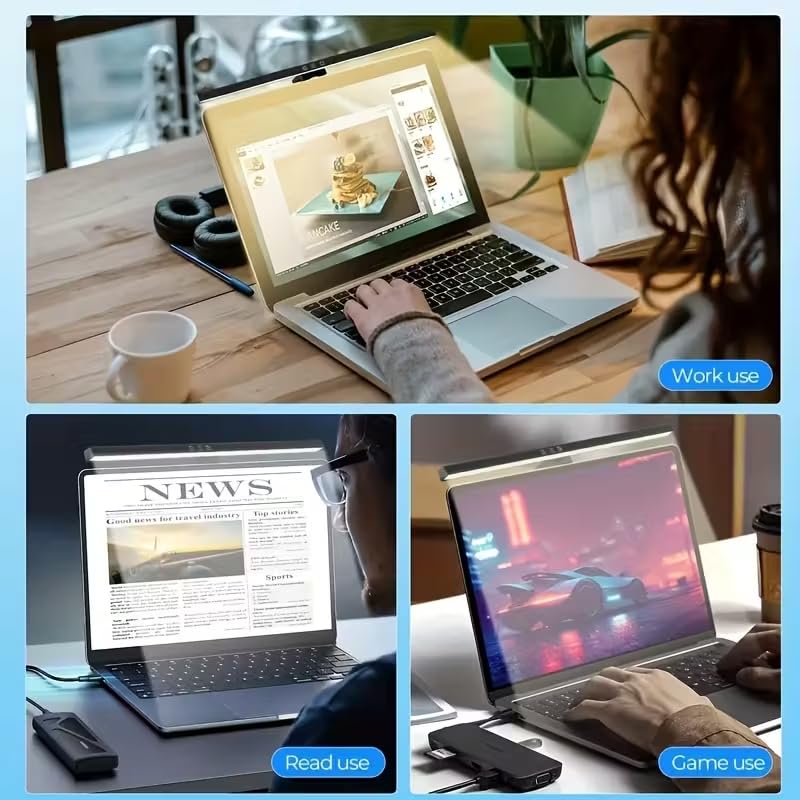
The HDView Monitor Light Bar is a USB-powered LED lamp that clips directly onto your monitor to light your desk without taking up space. It is designed for home office workers, students and gamers who spend long hours at a computer and want to reduce eye strain.
Its standout feature is the asymmetric optical design that illuminates only the desk area while avoiding screen glare and flicker. With three color temperatures from warm 2700K to cool 6500K, adjustable brightness, CRI over 95 and 700 lux illumination, it delivers natural, comfortable light for work, reading or gaming, and the memory function recalls your last setting.
Design wise, the lamp has a minimalist black finish with intuitive touch controls and a lightweight ABS plastic build at just 6.4 ounces. The patented clip installs in seconds without tools and fits flat screens from 0.12 to 2.2 inches thick, while USB power keeps cabling simple and the 60 minute timer adds convenience.
The main drawback is compatibility, as users with thick or curved monitors report a loose fit and slipping. The compact 14 inch bar can also feel small for extra wide desks or large dual monitor setups, and the plastic construction is less premium than metal alternatives.
Overall, the HDView Light Bar is a practical and affordable eye care upgrade for anyone using a flat panel monitor. If your monitor has a slim, flat back, it offers excellent value, easy use and comfortable lighting for long work sessions.
Brand: HDView | Model: Monitor-Light | Light Source: LED with CRI greater than 95
Color Temperatures: 2700K, 4000K, 6500K with dimmable brightness and memory function | Illuminance: 700 lux and above
Controls: Touch control with 60 minute auto timer | Power: USB powered | Mounting: Clip on, fits 0.12 to 2.2 inches thickness
Dimensions: 14 x 2 x 5 inches | Weight: 6.4 ounces | Material: ABS plastic with polished black finish
Certifications: CE, RoHS, FCC, IEC62778 Anti Blue Light | Warranty: 1 year manufacturer warranty
Pros
- Wide 10-30V compatibility for versatile monitor and TV repairs
- High brightness dense 84 LED arrangement with low energy consumption
- Exceptional 100,000 hour service life for long term durability
- Complete all in one kit includes strips, driver board and cable
- Provides stable, even lighting that helps reduce eye fatigue
Cons
- Requires technical skill and multimeter use to wire 12V, GND and ON correctly, not plug and play
- Brief and unclear instructions can be confusing for first time installers
- Not water resistant and rated for indoor use only
The SEIWEI 490mm LED Backlight Strip Kit is a specialized conversion module that replaces aging CCFL tubes and inverters in LCD monitors and TVs with modern LED lighting. It is built for DIY technicians, repair shops and hobbyists who want to restore dim, flickering or completely dark screens without replacing the entire display.
In real world use, the dual 84 bead strips deliver impressively bright and even white illumination across the panel. The wide 10 to 30V input and included driver board with VIN, ENA, DIM and GND pins provide flexible power and brightness control, while the low energy design helps reduce power consumption and eye fatigue during long viewing sessions.
Build quality is solid for the category, with fiberglass panels and a compact 490mm by 4mm form factor that fits neatly into original LCD grooves using double sided adhesive. The kit feels durable and purpose built, and the advertised 100,000 hour lifespan suggests excellent long term reliability for repaired displays.
Installation is not beginner friendly and requires identifying 12V, GND and ON points on the power board, often with a multimeter. The included instructions are brief and somewhat unclear, so some electrical knowledge is essential. It is also strictly for indoor, non water resistant applications.
Overall, this is a cost effective and practical solution for extending the life of CCFL based LCD screens. If you are comfortable with electronics repair, it offers bright, efficient and long lasting results. For novices, professional help is recommended to ensure a safe and correct installation.
LED Strip Size: 490mm x 4mm x 2mm with 84 lamp beads per bar, Cross Flow Plate Size: 70mm x 20mm. Input Voltage: DC 10V to 30V. Light Color: Bright White, Light Source Type: LED.
Included Components: 2 x LED strips, 1 x Driver Board, 1 x Cable. Material: Fiberglass panels with vinyl, metal and glass elements. Form Factor: Strip Lights, Color: Black.
Features: High Brightness, Energy Saving Design, Easy Install with double sided adhesive. Control: Wired, Button Control with VIN, ENA, DIM, GND pins for power, on/off and brightness adjustment.
Pros
- Direct fit for specific 32-inch curved monitor models when part numbers match
- Aluminum board provides better heat dissipation than standard flexible strips
- 40 LEDs deliver bright, even coverage across the curved display
- Lightweight and adjustable design aids careful installation
- Affordable alternative to full panel or monitor replacement
Cons
- Requires technical skill and full monitor disassembly, not a plug and play accessory
- Very short 7-day manufacturer warranty offers limited coverage
- Listing shows conflicting light color information as both Blue and White light, requires verification
The GuDeWang G32QC LED Backlight Strip is a specialized internal replacement part designed to restore illumination to 32-inch curved monitors such as the MSI G32QC and MAG322CQRV. It is not a general purpose LED strip, but a precise component for displays suffering from dim, flickering or dark screens due to backlight failure. This product is best suited for repair technicians and confident DIY users comfortable disassembling a monitor.
In real world use, the 40-LED array is engineered to provide uniform white light across the 32-inch curved panel when matched to the correct original part numbers. Compatibility with HRS_SE32_20S2P_MCPCB, E355813, E501286 and SSC_SE32_20S2P_MCPCB_V3 is its key strength, ensuring correct voltage, length and connector fit. When installed properly, it restores original brightness without hotspots or uneven dimming.
Build quality centers on the aluminum MCPCB, which offers superior heat dissipation and rigidity compared to cheaper fiberglass or flexible strips. The 60V DC corded electric design supports stable, flicker-free operation for indoor use. At just 4.8 ounces, the strip is lightweight and adjustable, making delicate handling easier during installation.
The main drawbacks are complexity and limited buyer protection. Replacing an internal backlight requires careful panel removal and is not suitable for beginners. The 7-day warranty is notably short for a repair part, and the specifications list both Blue and White light, which can create confusion about actual color output.
Overall, this is a practical and economical fix for reviving a compatible 32-inch curved monitor that would otherwise require costly panel replacement. For users who have verified their exact LCD model, LED count and interface, it offers a targeted solution that extends display life. Just be sure to double check compatibility and be prepared for a technical install.
Model: G32QC LED Backlight Strip, HRS_SE32_20S2P_MCPCB, SSC_SE32_20S2P_MCPCB_V3, LB32123
Compatibility: 32-inch curved screens including G32QC and MAG322CQRV, 40 LEDs
Material: Aluminum MCPCB, White light output, Corded Electric 60V DC
Usage: Indoor, Adjustable, 4.8 ounces, 1 Count
Manufacturer: SanFang for GuDeWang, Part Number G32QC LED Backlighting Strip
Before ordering, confirm your original monitor model, MCPCB part number, LED count and connector interface to ensure exact compatibility. Even small variations in 32-inch panels can prevent proper fit or function.
This is an internal component that requires full disassembly of the monitor housing and LCD layers. Installation should only be attempted by those with electronics repair experience and proper tools to avoid panel damage.
Due to the short warranty period, inspect the strip immediately upon arrival and test fit before final reassembly. Keep your original part for comparison until installation is complete and verified.
Pros
- Vibrant, saturated RGB backlight with responsive screen and music sync enhances immersion
- High CRI, anti-glare front light with adjustable color temperature reduces eye strain
- Secure clip mount installs easily and keeps desk clear
- Works great without software, while PC app unlocks deeper presets and fine tuning
Cons
- Companion software feels basic and could be more polished
- RGB modes are somewhat limited compared to higher end ambient systems
- Front light can create minor glare on monitors with thick glossy bezels
The ZIYUOPU RGB Monitor Light Bar is a dual function USB lamp designed for computer monitors in gaming setups and home offices. It combines a front task light for work and study with a rear RGB strip for atmosphere, making it ideal for users who want both productivity and immersion from one compact bar.
In real world use, the front light delivers soft, accurate color with three temperature options and smooth brightness control, while the rear RGB adds noticeable immersion. Screen sync extends on screen colors onto the wall behind the monitor and the music mode pulses accurately to both system audio and ambient sound.
Build quality is a highlight, with an alloy steel body that feels sturdy yet lightweight and a clip mount that stays secure on most flat and curved monitors. The USB powered, plug and play design needs no adapter, and the heat dissipation structure keeps the light stable and flicker free during extended use.
There are a few tradeoffs to note. The PC software enables independent control of both zones but feels somewhat basic, and the selection of RGB effects is more limited than premium alternatives. Fit can also vary, as the front beam may reflect slightly on monitors with thick, glossy top bezels.
Overall, this light bar offers excellent versatility and value for its feature set, blending practical eye care lighting with fun, immersive RGB effects. It is best suited for gamers, students and home office users who want an affordable, space saving upgrade that works well with or without software.
Light Source: LED with dual light zones, 2 light sources, high CRI front LEDs and RGB rear strip
Lighting Features: 3000K warm, 4500K natural, 6500K cool white, stepless brightness, 16 million RGB colors, dynamic effects, audio sensing sync, screen color sync
Controls: Physical buttons for power, brightness and mode plus PC software for independent zone adjustment and presets
Mounting and Power: Clip mount for flat and curved monitors, universal USB plug and play, no driver or adapter needed
Build and Details: Alloy steel construction, Grayish Black finish, Modern style, Model RGBW RG001, includes power cable, 2 year manufacturer warranty
Pros
- Asymmetrical lighting eliminates screen glare and reduces eye strain during long sessions
- High 95+ CRI and 700 lux output delivers bright, natural and flicker-free illumination
- Compact clip-on design frees up valuable desk space and keeps workspace tidy
- Simple push-button controls and USB power make daily use effortless
- Certified safe with CE, RoHS and FCC certifications
Cons
- Clip spring could be stronger, fit may feel loose on thicker monitors
- Only compatible with 15 to 22 inch flat monitors, not ideal for ultrawide or curved displays
- Limited to 3 brightness levels instead of stepless dimming found on premium models
The CATPOWER GD-F5 is a compact LED monitor light bar designed to sit on top of your monitor and illuminate your workspace without taking up desk space. It is built for students, remote workers, coders, and gamers who work late or in dim rooms and want focused, eye-friendly light without screen glare.
Its standout feature is the asymmetrical optical design that directs light onto the desk while keeping it off the screen, reducing eye strain and flicker. With over 700 lux output and a CRI above 95, colors look natural and text is easy to read, and users report a clear improvement for typing at night and working around a laptop.
Design is modern and minimal, with a matte black finish, rectangular bar shape, and lightweight plastic construction that weighs just 16 ounces. The clip mounts securely to flat monitors between 15 and 22 inches, and the push-button controls let you quickly switch between three brightness levels and a wide 3000K to 7150K color temperature range.
There are a few tradeoffs to note. The clip spring is not the strongest, so fit can feel loose on monitors at the thicker end of the range, and the light is not compatible with larger or curved ultrawide screens. The plastic build keeps it affordable and light, but it does not feel as premium as aluminum alternatives, and dimming is stepped rather than smooth.
Overall, the CATPOWER monitor light bar delivers impressive eye-care performance, practical space savings, and easy USB-powered convenience in a simple package. If you want an effective way to light your desk without glare or clutter, it is a smart and highly usable upgrade for any compact monitor setup.
Model: CATPOWER GD-F5 monitor light bar with 84 high-efficiency LEDs. Power source is USB powered, 5 watts, 5 volts via included power cable, no extra adapter needed.
Lighting performance includes at least 700 lux, CRI over 95, 3 brightness levels, and adjustable color temperature from 3000K to 7150K. Lighting method is LED with push-button control and asymmetrical optics to prevent glare.
Mounting is clip-on for flat monitors 15 to 22 inches with thickness from 0.039 to 1.96 inches. Dimensions are 15.7 inches wide, 3.54 inches deep, 3.9 inches high, weight is 16 ounces.
Materials are ABS plastic with painted black finish, rectangular modern style. Certifications include CE, RoHS, and FCC, with 1 year manufacturer warranty. Intended for indoor use for coding, gaming, office, reading, and study.
When resets do not bring your bar back, a new monitor light bar with reliable USB power, stable dimming, and proper clip fit can solve the issue quickly. The options above offer dimmable controls, eye caring diffusers, and secure mounts that help you restore consistent, flicker free illumination without complex wiring.
When This Won’t Fix It
This troubleshooting will not fix a bar with a burned out internal LED driver, a cracked circuit board from a drop, or water damage. If you see physical damage, persistent flicker after trying multiple cables and adapters, or no response after a reset, replace the unit or contact the manufacturer for warranty support instead of opening it yourself.
Frequently Asked Questions
Why does my monitor light bar turn on then immediately turn off?
This usually means insufficient power or auto dimming is engaging. Your USB port may not supply enough current, or the bar is set to auto mode in a bright room. Switch to a 5V USB wall adapter, disable auto brightness, and increase manual brightness to stabilize it in 2026.
Why is my monitor light bar flickering or dim on one side?
Flickering often comes from a loose cable, a failing adapter, or a dirty touch control. Reseat the USB plug, try a different adapter, and clean the control strip. If only one side stays dim, the LED strip inside may have a partial failure and you should consider a replacement for even coverage.
Can I power my monitor light bar from my monitor’s USB port?
You can, but many monitors cut USB power when they sleep or deliver less current than a wall adapter. If your bar works inconsistently, use a dedicated powered adapter instead. For more stable setups, explore our home office lighting solutions to plan reliable power routing for all your desk accessories.




Write Your Review
No reviews yet. Be the first to share your experience!